
How To Enable Cut Paste In Mac Finder?
Sometimes Apple can be just plain ignorant. All these years and they still don't have a proper way to Cut/Paste files and folders on Mac! You have to select the files, and drag them to the target location using the mouse. It makes moving files suck a pain in the ass.

Thankfully, there is a solution. Kapeli's moveAddict for Mac fixes the long faced problem of Mac users. moveAddict provides the simple functionality to move files using the keyboard. You can select the files, Press "Command + X" to cut the files, select a target folder and Press "Command + V" to paste the files. It's just like Windows. You can add Cut, Copy and Paste buttons on Finder's toolbar.
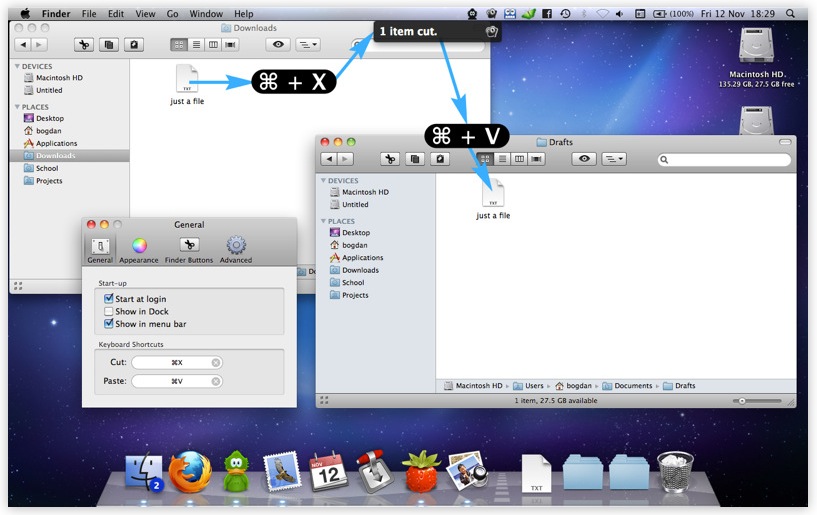
moveAddict also adds the "merge folder" functionality when you are trying to move a folder to a location where another folder of the same name exists.
moveAddict has minimal and pretty simple settings. You can see my preferences in the screenshots provided ahead.


moveAddict costs $7.99 normally but it's available for just $1.99 for a limited period on the Mac App Store. You should buy it right away!
Comments (14)
Archived from woikr.com. Comments are read-only.
James Smith João Pessoa, Brazil · 2011-02-22 00:40
Yes, you van alsi drag and drop items. For example, you can select text and drag it to a new location.
Before you put nonsense like this on the internet, you should make at least a rudimentary effort to learn if it's true.
I've been using Macs and Windows systems side-by-side on a daily basis since the mid-80s. Macs have always worked this way. In fact, Windows copied the key combinations from the early Mac OS. But then, almost anything else you like about Windows was copied from the Mac, too.
Chirag · 2011-02-22 09:57
Also, Cut/Paste has never worked on Finder folders. Please read before you start blabbering.
James Smith João Pessoa, Brazil · 2011-02-22 16:40
Maybe you were unable to comprehend that I said have been using Macs and Windows systems together since before you were probably born. I do know what I am talking about. I am not "blabbering" but stating facts. .
You insult people on here in a way you would never do to their face. You seem to be a typical internet coward that knows nothing but acts smart and brave when safely hiding behind his keyboard.
Chirag · 2011-02-22 16:55
Select any folder/file in your Finder and Press "Cmd + X". Now goto another folder and press "Cmd + V", nothing will happen (Unless you have installed some script or plug-in to do so)
In fact if you select any folder and goto Edit menu you will see that the Cut option is disabled.
Chirag · 2011-02-22 16:58
I'm updating the article title to clear the confusion.
Chirag · 2011-02-22 17:01
James Smith João Pessoa, Brazil · 2011-02-22 17:12
What I also do not understand is why cutting is so important. I rarely use that in any case. I almost always copy, paste, then return and delete the original. That way, if something goes wrong between the cut and the paste (power failure, software glitch) I have not lost anything. I do it the same way on Windows systems. In fact, that's probably where I got the habit. They seem to be a lot more prone to "something went wrong" and have made me a bit "cut-shy."
The extra steps of returning to delete the folder/file I have pasted in nothing compared to losing the data.
FWIW< you can move folders or files in Finder by dragging and dropping. Simply open a new Finder window (Cmnd + N) and open it to the destination. Then click on the original Finder Window, select the Folder/File you wish to move and drag and drop it to the destination. This is safer than cut and paste.
James Smith João Pessoa, Brazil · 2011-02-22 17:14
Chirag · 2011-02-22 17:26
And while I don't use Cut/Paste often, this utility is great for someone who switches from a Windows to Mac!
James Smith João Pessoa, Brazil · 2011-02-22 19:13
Having said that, I confess I have several add-ons to FireFox and a few for my system, too. But I don't hesitate to dump them is I suspect there may be a problem.
Yes, mea culpa, too ;)
Josh · 2011-04-22 04:39
You are a genuine fucking idiot.
-josh
James Smith João Pessoa, Brazil · 2011-04-22 21:03
CJ · 2011-04-26 12:50
To MOVE a file or folder press Command and drag the item to the new location. It will be deleted from the old location.
:-)
CJ · 2011-04-26 12:50