
I love VLC. The simple reason: it comes in a package. No clumsy codec downloads or crappy, hard to update codec packs. So when I thought of switching to Mac (will talk about that during the coming weeks), I was happy to see that VLC was there.
But VLC on Mac comes packed with a huge problem. All your movies, TV Shows skip randomly and the whole experience is not perfect at all. It feels like playing from a badly scratched DVD. The surprising thing is that the same videos work flawlessly in QuickTime + Perian, which by the way is way better than any windows-based codec pack.
The good news is that after Googling and fiddling around with VLC Preferences, I’ve finally found a simple solution. Turns out, the problem is not with VLC but with the default settings that it comes with. Here is what you need to do to fix it.
- Open VLC and goto VLC->Preferences from the Menu Bar on the top.
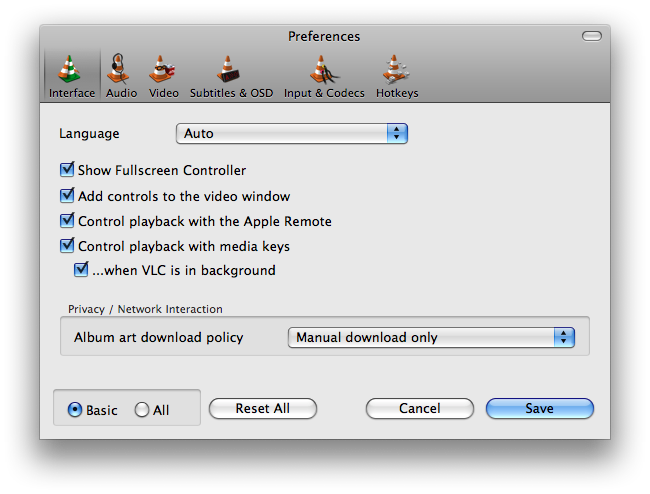
- Select All instead of Basic to open the Advanced Preferences interface.
- Expand Access Modules and select File.
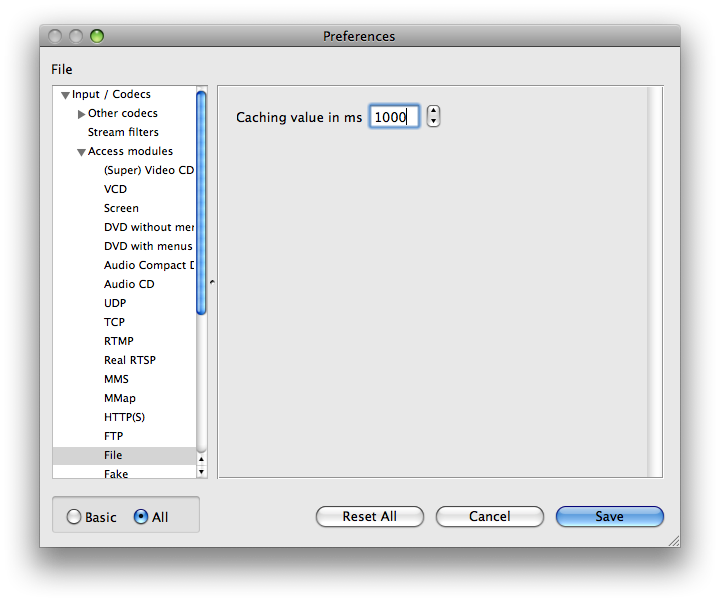
- Change the Caching Value from default 300 to 1000 (Or higher if the problem persists).
So that’s it. VLC on Mac plays videos perfectly as it should.


One response to “Fix VLC skipping problem on your Mac”
Thanks but didn't stop mine from skipping.
It only happens when I click pause and play again.
Any other clue?