
[UPDATE]: This was happening as Apple did not upgrade the baseband in 2.1, 2.2 or 2.2.1. So, if you update from an unlocked 2.0 to these versions, your iPhone will remain unlocked. If you are upgrading from previous versions (1.1.x), please follow woikr’s guide to upgrade and unlock using QuickPwn.
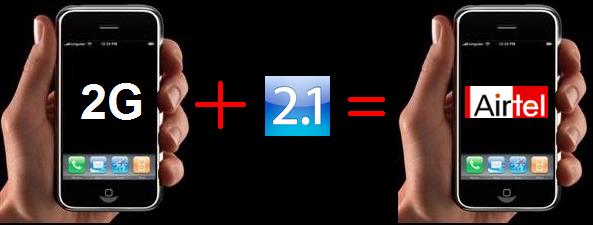
We have reasons to believe that the iPhone 2.1 firmware on an iPhone 2G does not need unlocking to work with the Airtel (and Vodafone) network in India. As a matter of fact, if you have a 2G device in India, you can reap in most of the benefits of a legal user (sans the warranty). We have verified that this is working with iPhone 2Gs here at woikr.
Note: If you have an iPhone 2G with < 2.0.2 firmware, it is recommended that you upgrade to 2.0.2 first. Our very handy guide to upgrade can be found here.
So, what do you need to do? The process described below will not erase any data (Contacts, Settings etc.) from your iPhone 2G. If you had jailbroken your iPhone and installed any apps from Cydia, they will be deleted. All your apps purchased from the App Store and their settings will be preserved.
- Download firmware 2.1 for iPhone 2G.
- Download and install iTunes 8.
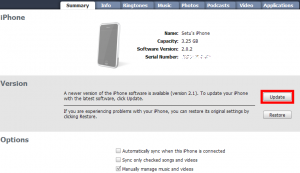
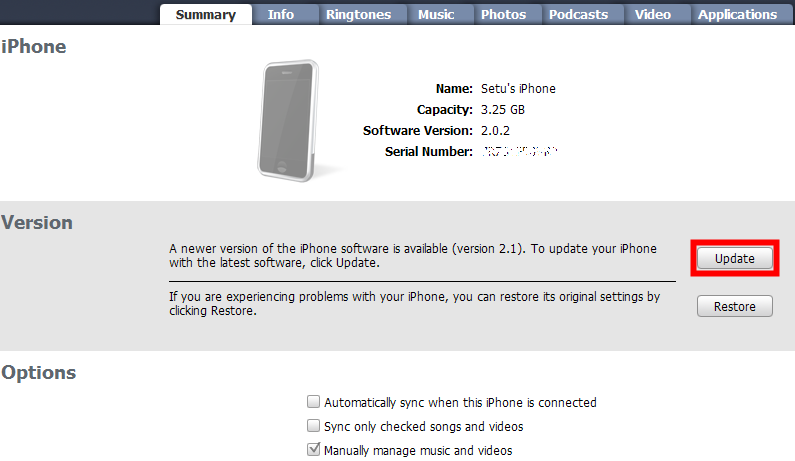
- Connect your iPhone 2G to your computer. Once it is detected in iTunes, Hold Shift and click on the Update button under the Summary tab in iTunes:
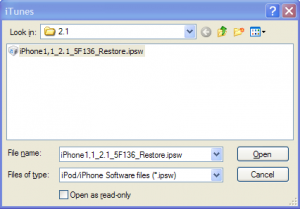
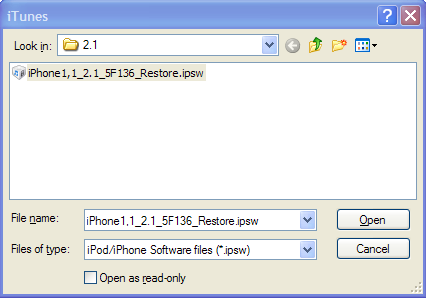
- In the dialog box that pops up, browse and select the iPhone 2.1 firmware file you downloaded above:
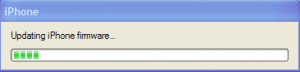
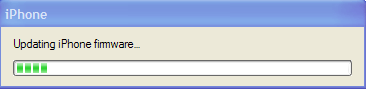
- iTunes will start updating the firmware of your iPhone 2G:
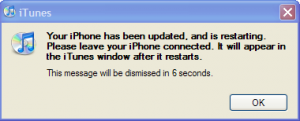
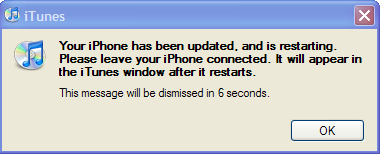
- Once the update is complete, your phone will restart. iTunes will also display a message:
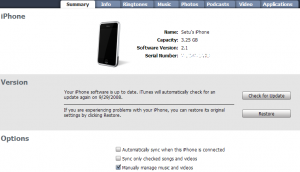
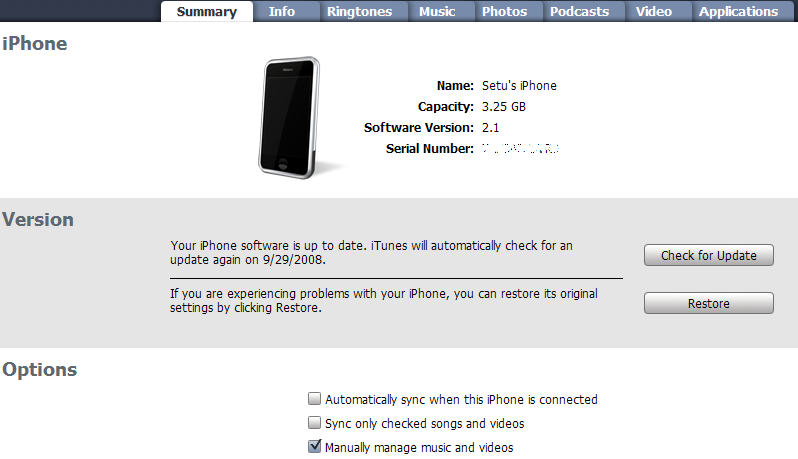
- After the phone restarts, it will be unlocked and activated to work with Airtel and Vodafone. Moreover, you will be able to (hopefully) upgrade it to the next version without loosing any data:
- If you want to jailbreak your iPhone, follow the steps here starting from step 3.
FAQs:
Q. 2.1 firmware works with iPhone 3G in the same way. What’s the big deal?
A. It is actually a big deal. Firmwares for iPhone 2G and 3G are different. iPhone 2G was never officially launched in India. All the iPhone 2Gs here were bought in the US and unlocked using old unlocking methods and ziphone. There is no reason for Apple to release a firmware for 2G which works with Airtel or any other carrier in India.
Q. Hmm. Understood. What does this mean for us – iPhone 2G users in India?
A. If we assume that this was an intentional move on Apple’s part, this is great news for all iPhone 2G users in India. They can finally set themselves free from the hassle of upgrading and restoring every time a new firmware is released. However, there is a pretty good chance that this was a slip.
Q. Does this mean that if I bring an iPhone 3G from the US, it will work with Airtel in India?
A. Probably not. As mentioned above, firmwares for 2G and 3G are different. They will probably have that lock in place for handsets sold in the US. Also, unlike iPhone 2G, it is not possible to just buy and bring an iPhone 3G from US to India as it needs to be bought with a 2 year service agreement with AT&T. However, if you bump into anyone traveling to India from US with an iPhone 3G, do give it a try and let us know the outcome in comments.
Q. What does this mean for Airtel?
A. More embarrassment. For a company which makes idiotic bizarre claims, this will come as more LOL.
Psst: I heard that Airtel is offering free 500 MB of data usage over EDGE with every iPhone 3G. Will that plan work with this?
A. NO. You will have to purchase a separate data plan for this.
UPDATE:
We’ve recently tested that this work with Vodafone in India too. Wonder if this will work with International carriers!


120 responses to “iPhone 2.1 firmware for iPhone 2G working in India without unlock [Breaking News]”
[Comment edited by admin]
<del datetime="2008-10-16T08:42:16+00:00">It doesn't work.
I updated my firmware to 2.1 and it didn't work. I have an Airtel Connection.</del>
[Note added by admin]:
It works: http://woikr.com/apple/iphone-21-firmware-for-iph…
@sidk –
Did you upgrade your phone to 2.0.2 prior to doing this? Please download the firmware ipsw file linked above only. Also, make sure you click on upgrade and not Restore in iTunes.
Setu – any thoughts on syncing google calendar with iphone2.1?
@Ankur –
There is an app called NemusSync (http://www.nemustech.com/iPhone/NemusSync.html) which syncs your iPhone calendar with your Gooogle calendar.
If you have jailbroken your iPhone, you can use NemusSync. The latest version is compatible with 2.1 and is available in Cydia.
oh! didn't update it to 2.0.2…… I'm doing it now.
Can u please explain me step by step, as to how to go abt it, aftr restoring 2.0.2.
It says install a comparitable sim or unlocked sim
@sidk –
Once you upgrade to 2.0.2, follow the exact steps detailed in the article above and you should be all set.
All set and done, thanx Setu!!
But there is one big problem, if u restore the firmware aftr installing 2.1 version for some reason or the othr, the iPhone 2G gets LOCKED!!!
@sidk –
Great to hear the news!
Restoring the firmware will surely lock up your phone as it completely formats and reinstall from scratch. Whereas, upgrading will only upgrade the changed components.
Setu, as you have mentioned in your article above that if ones iPhone 2G is < 2.0.2 the user first has to upgrade and jailbreak(as per iClarified or BigBoss). Then use the above mentioned steps and update(not Restore) to 2.1
Is it so that the update to 2.1 is modifying only certain packages(mostly just the apps) rather than the hacked base band loader. In which case, this might not be a mistake from Apple but rather just a coincidence.
If it is not the case as i just wrote and Apple indeed made a blunder then shouldn't the 'update to 2.1' work for 2.0.1 without an upgrade to 2.0.2????(if yes, this might same a lot of time for people)
@wolverine –
The reason why it is recommended to upgrade to 2.0.2 first in the article is because some users faced issues with Mail app after updating to 2.1 from < 2.0.2.
However, I completely agree with your premise of Apple only updating the outer layers of the OS for 2.1 leaving the baseband etc. untouched. This can be confirmed if someone tries upgrading from 2.0.1 to 2.1 with the above process. Sadly, all of us at woikr are upgrade freaks and updated our iPhones to 2.0.2 as soon as compatible winpwn was released. Hence, we could not test this hypothesis with any of our iPhones.
In case any of the readers succeed in doing so, we would love to know the results in the comments.
Hi folks@woikr,
I updated my iPhone 2G from 2.0.1(Jailbroken using pwnage) to 2.1 software in exactly the way you described in this article.
Finished testing all the basic applications that come with the software like WiFi, Youtube, Mail , SMS e.t.c . Everything works like a charm.
FYI. I used windows platform.
Thanks a ton, guys.
By the way, I forgot to mention. I am a vodafone subscriber.
@wolverine –
That's great news! Congratulations!
And thanks for sharing the result here. It will be helpful to other users.
I was having an iPhone 2G jailbroken with ziphone. Yesterday I started wondering if I could directly upgrade to 2.1 sw. Decided to google first and found this link as the top hit !
Today I first pwned to 2.0.1 and then did a direct update to 2.1 using steps mentioned above.
So far I have been only able to test out the phone features successfully since wi-fi at my home is currently broken.
One thing that I observed after the update was that the cyndia installer app was gone. The update seems to have wiped out this app.
thanks for the tips anyways ! Now i am 2.1 unlocked on airtel.
@Arun –
Wiping out of cydia and apps installed through it is expected behaviour as mentioned in paragraph 3.
Congratulations on your successful upgrade to 2.1 and thanks for the comments :).
hey! i'm using a 1.1.4 2G(ofcourse)..and need to upgrade to 2.1.;.so do i need to go in for the metastable 2.0.2 or can i jus directly upgrade to 2.1?
@rohit –
You can directly upgrade to 2.1 from 1.1.4. However, you might have to jailbreak & unlock using QuickPwn in that case.
Also, some readers experienced issues with Mail app when they upgraded directly from 1.1.4 to 2.1. Hence, it is recommended to first upgrade to 2.0.2. Our guide to upgrade from 1.1.x to 2.0.x is available here: http://woikr.com/apple/how-to-upgrade-and-unlock-…
after upgrading 2.1, are able to use voice mail in your airrtel/vodfafone connection
Hi Dear setu
Your suggestions are very useful & workable. Last time i was panic after upgrading from 2.0 to 2.0.1 fo two days as my unlocked iphone is locked again after upgrading to 2.0.1.But after getting your link explaining to unlock after udating to 2.0.1, I could succeed.THANKS A LOT. but i am affraid to update to 2.1 due to previous exp. before taking your help.Now I wish to update to 2.1, is there winpwn available for 2.1 for windows? Please give suggestion on this , other querry is ….
My other querry is, I am using my iphone 2.0.1at Ethiopia, where presently 3g sim cards available (provided by ZTE, when I started using it ,internet browising is very slow could not browse ven a single window i phone, what may be reason
i was upgrading from 1.1.4 to 2.1 and it displayed an error in updating-error(6),leaving my phone in recovery mode with no option but to restore..i do not have an internet connection!!what can i do??i have the 2.1 ipsw with me.
@suresh babu –
We are glad to be of help. If you wish to unlock an iPhone 2G with 2.1 firmware, you will have to use QuickPwn instead of WinPwn. QuckPwn is developed by the same guys who were developing WinPwn. Instead of developing two different products, they are now focusing on one product – QuickPwn which can be used for iPod Touch, iPhone 2G and iPhone 3G.
You can follow this guide: http://sleepers.net/news/2008/08/19/quick-pwn-gui…
Regarding your other issue, the speed you get depends on a lot of factors like network coverage, number of users, and the network throughput. Also, putting a 3G sim in a 2G handset won't give you 3G speeds. You will need a 3G handset. The speed you get is usually lower than what the carriers claim.
@rohit –
Here is what you can do:
1. Make sure you have iTunes 8.
2. Connect your phone to your computer.
3. iTunes will say that the phone is in recovery mode and must be restored. Click OK.
4. Hold Shift and click on the Restore button in iTunes.
5. Browse and select the iPhone 2.1 ipsw file.
6. iTunes will restore your phone to 2.1.
7. Use QuickPwn to unlock your phone. Here is the guide: http://sleepers.net/news/2008/08/19/quick-pwn-gui…
Hope this helps.
Hi Setu,
Sometime back I Winpwned my 1.1.4 1st generation iPhone to 2.0.2. Everything worked fine but there was no EDGE connection for me. On 1.1.4 I used advanced GPRS plan for vodafone india. Now in this new firmware I was able to connect to any internet services using the EDGE service on my SIM, though there is an "E" sign on the home page of my iPhone. When I checked into the Settings–> General –> Network, there was no option for EDGE. There was only VPN, WiFi and Data roaming. Is this inherent to later firmware? After this I reverted back to my old 1.1.4. later on I even tried to do an upgrade from my 1.1.4 to 2.1 and Quickpwned it. But this time also it failed. In fact this time the phone wont recognise the sim at all. When I put my sim into the phone there is no message and there is no network showing up. Please help as i really want to upgrade to 2.1.
Thanks in advance,
Jammy
@Jammy –
Apple removed the EDGE settings option from 2.0 onwards (morons, I know).
However, you can enable it by a simple hack:
1. Jailbreak your iPhone and install OpenSSH from Cydia.
2. SSH to the iPhone using WinSCP or any other SSH software.
3. Go to /var/mobile/Library/Carrier.Bundle Bundles/.
4. Edit the carrier.plist file (You might have to download it and open it in a text editor).
5. Go to the section right below TTY and add in these two lines:
<key>AllowEDGEEditing</key>
</true>
6. Save the file and upload it back to your iPhone.
7. Reboot your iPhone. Once rebooted, when you go back into Settings -> General -> Network you should see a new Network Settings option at the top.
Regarding your other issue of sim not being recognised, I will suggest:
– Restore to a fresh 2.0.2 firmware from apple using the steps here: http://woikr.com/apple/how-to-upgrade-and-unlock-… and unlock your phone using WinPwn 2.5.
– Upgrade to 2.1 using the steps in this article.
@Setu@woikr
Thanks Setu for your prompt reply.
One more concern for me is that I don't have a working wi-fi hotspot at home. Will I be able to go to public hotspots such as at CCDs and install OpenSSH through Cydia? I mean will wi-fi still work on my iPhone?
In your column you wrote, "So, what do you need to do? The process described below will not erase any data (Contacts, Settings etc.) from your iPhone 2G. If you had jailbroken your iPhone and installed any apps from Cydia, they will be deleted. All your apps purchased from the App Store and their settings will be preserved." . So after upgrading to 2.1 I won't have any of the applications I installed through installer or Cydia. But will my iPhone on 2.1 firmware still have these two applications i.e. Installer and Cydia?
Thanks again,
Jammy
@Jammy –
Your wifi should work at public wifi hot spots and you should be able to perform the SSH operations I suggested above.
However, if you are planning to upgrade to 2.1, I would suggest you first do that using the guide in this article (including upgrade and unlock to 2.0.2) and then perform the above hack, otherwise, it might get erased when you upgrade form 2.0.2 to 2.1.
Alternatively, since iPhone is now available in India through Airtel and Vodafone, you can try out the following steps as well:
1. Once you upgrade to 2.1, insert your vodafone sim and connect to iTunes 8.
2. It should prompt you to download carrier settings. Click OK.
3. Check to see if your EDGE works. If it still doesn't, proceed with the hack.
No, you will NOT have Installer or Cydia available on your iPhone once you upgrade to 2.1 using the steps mentioned above. They will also be erased with the apps you installed through them. However, you can use QuickPwn to jailbreak your iPhone and install Installer and Cydia again after the upgrade. Detailed steps here: http://www.iphone-hacks.com/2008/09/23/how-to-use…
Hey guys i have found a way for you all to restore your backup from iphone pc suite .. like contacts/sms/etc .. even i upgraded my phone from 1.1.4 to 2.1 but panda iphone pc suite was not functioning !! after searching teh net for 2 days .. i got all my data up and running .. first d/l Total commander and add teh plugin
t-pot for it. this plugin will recognize your iphone and thr u can just copy n paste the files in teh respective folders … all my data is restored … 😀 like .contacts/sms/pics/videos .. ringtones had to make them again .. as the path whr it stores i cudnt locate.. anwyays cheers and all teh best !!
hi buddy nice work,
im an expert at pwning iphone,
can u jus tel me if this 2.1ver works on any carrier in india without jailbreaking?!?
hi,
I bought a AT&T iPhone 2G in US. I opened the box in India. Please provide me the steps to upgrade/unlock the phone to use for a Vodafone connection in India. Helpe need in
1. how to change the SIM card
2. do I have to activate the phone
3, upgrade/unlock the phone to use vodafone in n India
@srikanth !!
I bought a AT&T iPhone 2G in US. Great man !!! <– how much it costed u? 😛
I opened the box in India. Please provide me the steps to upgrade/unlock the phone to use for a Vodafone connection in India. Helpe need in
1. how to change the SIM card <– use a Pin and it is at the top of the iphone .. thr u can locate a small hole just press it with a pin and the sim card holder shud pop out
2. do I have to activate the phone <– well i guess u upgrade to teh latest Firmware 2.1 ,, as mentioned here …
3, upgrade/unlock the phone to use vodafone in n India <– call up customer care .. and chk out ..
hi setu!
i have a problem regarding the EDGE settings as well. and found this thread very useful. but i have some questions regaring your step by step instructions on how to the settings back of EDGE…
@Jammy –
Apple removed the EDGE settings option from 2.0 onwards (morons, I know).
However, you can enable it by a simple hack:
1. Jailbreak your iPhone and install OpenSSH from Cydia.
2. SSH to the iPhone using WinSCP or any other SSH software.
3. Go to /var/mobile/Library/Carrier.Bundle Bundles/.
4. Edit the carrier.plist file (You might have to download it and open it in a text editor).
5. Go to the section right below TTY and add in these two lines:
AllowEDGEEditing
6. Save the file and upload it back to your iPhone.
7. Reboot your iPhone. Once rebooted, when you go back into Settings -> General -> Network you should see a new Network Settings option at the top.
*in number 5 instruction, you said that you will have to insert AllowEDGEEditing
right below TTY.. sorry for my ignorance, what is TTY?
*and also, can you do this in 2.1 frimware as well?
hoping for your reply on this. thanks!
steve,
PteroDactyl
thanks for finding a solution for that issue, BUT can you explain in details what i should i do in order to restore my Data to the New Version. I mean i did not understand what is the meaning of "" first d/l Total commander and add teh plugin
t-pot for it. this plugin will recognize your iphone and thr u can just copy n paste the files in teh respective folders "" !!.
Thanks alot
Hello,
I am visiting India from US and have a 2G iPhone that is locked on the AT&T network, and already has the 2.1 software installed.
I have an Airtel SIM. When I use that SIM, the display on the phone is same as if its a new Unactivated phone.
In iTunes, it also shows up as a new phone which needs activation.
How can I use this iPhone on the Airtel network?
Regards,
Mandeep
@Mandeep –
You cannot use it unless you unlock it which will void your warranty.
@steve –
TTY stands for teletypewriter. Check http://www.google.co.in/search?q=define%3ATTY for more details.
And yes, you can do this on 2.1 as well.
Hi Setu,
The carriers.plist file does seem to be a plain text file.
I opened it up using nano and vi text editors via ssh and also downloaded the same and opened it on notepad, however, it appears differently than as you described.
It got a lot of gibberish and other encoded elements and there is no clear carriage returns.
Any ideas on this?
hey setu
i have got an iphone3g how do i unlock it?
Dear All,
I am having one Iphone 2G model with firmware 2.1 and Itunes 8.0 and I was using this phone in USA.After coming here I took the Vodafone sim and inserted in my Iphone it is showing me message like different sim card detected.please connect to Itunes.But according to this site it is saying that if you will insert the sim it will work.but it is not working.Please some one help me.if possible help how to unlock it so that i can use further.I have tried many ways but all things are waist.
thanks in advance
@semil –
iPhone 3G unlock is still not available. People are working on it and you will hear about it from us as soon as it is out.
However, you can jailbreak it using QuickPwn.
@Prasanta –
Seems like you have a locked iPhone 2G with 2.1 version. To use it in India, you will have to unlock it using QuickPwn.
This guide is for people who had unlocked iPhone 2Gs running 2.0.2 and wanted to upgrade to 2.1.
Note that unlocking will void you warranty.
hey setu
in the 2.1 version i cant find any application to forward msgs do u know any application as such.please help me wid this.and one more thing do u know for how much is a turbo sim available for iphone 3g
@semil –
There is no out of box tool to forward messages in iPhone. You can use some 3rd party apps but you will have to jailbreak your iPhone.
We do not have any pricing details for the turbo sim card.
my phone is already jailbroken which application is there to forward msgs
@semil –
Search for SMS in Cydia and you should find some apps. I remember an app called iRealSMS there which had forwarding feature.
that is an paid application
@ semil on November 10th, 2008 at 4:24 pm:
my phone is already jailbroken which application is there to forward msgs
u can use BiteSMS .. install it with Cydia .. and just lide it from left to right direction over the msg to forward ot delete the msgs …
@ setu .. bro can u guide me on how to access the EDGE .. i have enabled the celluar Data netwrok, but the EDGE configuration .. for me to browse for free.. likei used to using 1.1.4 is not applicable here ..i tried to change the path to airtelfun.com and changed few settings in the Preference.Plist file … still cannot access the EDGE and surf for free if u can guide me ..plz
thanks !!
and yes BiteSMS is free .. u can change the send sms to options to in settings use Mobile carrier instead of biteSMS and its all FREE 😉
hey thanx a lot man i was looking for this thing since a long time.thank u once again
Thanks Setu.But I have tried with Quickpwn unlocking.but after all things copmpleted it is showing me an error that some file can not be restored.i am not able to understand the problem.is there any other option to unlock the Iphone 2G model with 2.1 software.
please let me know.i am totally upset.
thanks in advance
@ Blue Ice on November 2nd, 2008 at 1:11 pm
thanks for finding a solution for that issue, BUT can you explain in details what i should i do in order to restore my Data to the New Version. I mean i did not understand what is the meaning of
“” first d/l Total commander and add teh plugin
t-pot for it. this plugin will recognize your iphone and thr u can just copy n paste the files in teh respective folders “” !!. <— Download this Software TotalCommander from here http://www.ghisler.com/download.htm and then try and follow these steps .. from here http://modmyi.com/forums/os-apps-development/2455… , actually i just searched for the AddressBook.sqlitedb and AddressBookImages.sqlitedb replaced thm using total commander to retreive the contacts whic were backedup using IPhone PC Suite .. similarly for SMS i repalced teh s.s data base file with teh one backedup … just trial and error .. and got it .. cheers !! Sorry for late reply !!
Setu,
On my way to India. Gen1 iphone jailboken/unlocked with quickpwn to 2.1. Worked last year with Airtel MO. I first did a restore first to 2.02 using winpwn (before reading your tutorial) the onto 2.1. Seems like adding Allow Edge is the simple fix. However I also tried reading carrier.plist file and it is all on one line and hard to tell where to edit. Tried WinSPC editor and notepad. Please advise, Marc
Setu,
Found simple VPN app fix on Cydia installer
Hi,
I have upgraded my iphone 2G from 1.1.4 to 2.1 using QuckPwn. I am a vodafone user.
Previously i had taken iphone 799 plan and VMC was activated. The vodafone guy told me that VMC is not required so we deactivated it. Now my internet is not working. The same person now tells me that if we activate it again it will not work coz 2.1 does not support VMC and he does not know what to do.
Can anyone please tell me,
Is activating iphone 799 enough for me to access the internet.
Or do i need to activate anything else
Or should i change the plan.
Please guide
Thanks
@Tehan:
I use Vodafone myself and Vodafone Mobile Connect works perfectly fine.
You need a small hack though. Goto /private/var/mobile/Library/Carrier Bundles/Vodafone_in.bundle and edit the carrier.plist. Search for password in the file.
You'll see something like:
<key>apn</key>
<string>iphone</string>
<key>password</key>
<string></string>
<key>username</key>
<string></string>
Change "iphone" to "www". If you see this repeated twice, just change it in one place.
Save the file, Reboot the phone. It should work.
Thanks Chirag.
Just one more doubt,
do i have to keep the iphone 799 tariff plan for this or can i usedafone Mobile Connect with any other plan.
Thanks and regards
Tehan
i mean can i use vodafone mobile connect with any other plan. typo error.
@Tehan: Yes you can use any Vodafone Mobile Connect plan. I personally use the 499 one.
Setu, can you let me know how to add edge settings on 2.1 firmware (iphone 1st generation) in simple way
Thanks in advance
Indu
@Indudhar:
If you use Vodafone look at the comment above http://woikr.com/apple/iphone-21-firmware-for-iph…
If you use Airtel, EDGE should work out of the box. Assuming you upgraded your carrier settings after connecting to iTunes.
Indudhar
>>If you use Airtel, EDGE should work out of the box. Assuming you upgraded your carrier >>settings after connecting to iTunes.
Incorrect: There are No carrier settings on 2.1… Need to install APN Editing app/fix from Cydia installer. This adds the carrier settings back.
@drmarx:
If you connect your iPhone to you computer running iTunes, it'll prompt about downloading carrier settings (unless you've done this already).
It does for all of us @ woikr on Vodafone/Airtel connections.
Once you do this EDGE works OOB on Airtel.
I stand corrected. Apologies. I am a US traveler and won't have a computer (no itunes access) with me so I need to have the setting available to me in advance.
Hi Setu,
Thanks for ur help with the issue on EDGE. Now its working perfectly fine.
Now I have a query regarding the release of the firmware 2.2. Will the iPhone still work wen I upgrade to firmware 2.2 like wid 2.1??
Thanks,
Jammy
Hi Setu,
iPhone 2.1 firmware for iPhone 2G working in India without unlock [Breaking News]-
I first pwned to 2.0.2 and then did a direct update to 2.1 using steps mentioned above. the phone works perfectly fine on the Vodapone network and itunes 8.0.
will the iphone continue to work on vodafone without any issues after an upgrade from 2.1 to the new 2.2 upgrade
@Sri –
If you have an unlocked iPhone running on 2.1 firmware, you can update it to 2.2 in iTunes (following the steps above) and it will work fine with Vodafone in India.
setu,
i am not sure if I can it unlocked. the phone does not work with any other SIM card other than Airtel and Vodafone.
I used winpwn to upgrade to 2.0.2 first and then used itunes to upgrade to 2.1. I am able to load apps from the itunes portal; where I presume, I am being recognized as a legal user by apple.
i dont want to upgrade to 2.2 and find myself locked out.
Need help!
@Sri: You cannot run a locked phone on Indian networks. Hence it *is* unlocked.
Also, I upgraded my phone from iTunes yesterday (from 2.1 to 2.2). It worked flawlessly. Go ahead and do it!
http://woikr.com/apple/iphone-21-firmware-for-iph…
well.. setu.. i updated my 1.1.4 to 2.0.2 using quickpwn n it worked fyn.. den upgraded to 2.1 according to dis page n u.. it got updated bt it was locked.. although it was showing d network bars of vodafoneIN bt only emergency calls.. den waa d heck.. i again restored to 2.1 thru i tunes n quickpwnd n unlocked it.. cn u help????? y it was nt workin after dis update of urs???? to 2.1..
thnx in advance
hey.. before this article, i was with 1.1.4 i first tried to upgrade to 2.0.2 but it was unsuccessful leaving me into recovery state…. then i straightway upgraded to 2.1 and unlocked it using quickpwn and its works like magic…. thanks all esp SETU….
Hi all, i have 2g 1.1.3 version and got it upgraded thru a friend of mine to 2.2, now i cant find edge settings, went thru the above, downloaded winscp, i tunnel but am not able to SSH it thru PC, can some 1 help me please, i m using vodafone, thanks in advance
Hi,
I have 2g 1.1.4 version and got it upgraded thru I tunes. now my i phone is locked. i am using vodafone. how i can unlock my i phone.
Hello friends…. I’m in Big trouble … can any one help me in this issue…
I have I-Phone 8gb. My brother has purchased it from Australia for me. I have had unlock this I-Phone from here(India). I was working fine. But 2day when I connect my I-Phone to I-Tunes, then it showed an update for my I-Phone.
My old I-Phone software is 2.1 & it was 2.2. I updated my I-Phone to 2.2 software. After this update my I-Phone restarted & then the message appears that “The SIM Card inserted in this I-Phone does not appear to be supported. Only Compatible SIM Cards from a supported Carrier may be used to activate I-Phone. Please Insert The SIM Card that Came with your I-Phone or visit a supported Carrier’s store to receive a replacement SIM card.” please help me. if any one know about this problem. I have Airtel SIM & I’m living in Punjab.
@Sarab –
Looks like your phone has been unlocked. Follow our guide here: http://woikr.com/apple/iphone/how-to-upgrade-and-… to unlock your iPhone using QuickPwn.
i have iphone 1.1.3 i want 2 upgrade to 2.2.1 plzzzzzzzzzz help….
Setu
http://www.4shared.com/file/88661346/df1c7817/I-t…
go to this link … & see the picture I upload … My problem is that …. I cant restore my iPhone using Itunes …. plzz help me … wat I have to do …
if u have ur e-mail ID & u cam talk with me on yahoo or MSN … here is my 2 IDs
jatt_boyz88@yahoo.com sarablubana@live.in
thanx in advance
I'm guessing you have a non Airtel/Vodafone connection.
Try removing the SIM card and upgrading.
I have Airtel 64k SIM. I was working but after the update with ITunes 2.2… I'm facing all these problems. if I remove my SIM card then Itunes says that please insert a valid sim card with no pin to activate your iPhone ….. wat I have to do ..I cant understand ….
Hi Setu,
I had bought iphone 2g last year and got unlocked through a turbo sim with firmware 1.1.2, this has been working fine with vodafone sim card. Now since vodafone has service for iphone I would like to remove the turbo sim and upgrade the firmware to latest version. Can I do this with steps mentioned above and at what stage should I remove the turbo sim. Please suggest.
Thank You,
Akhilesh
I need help to make the vodafone mobile connect work on iphone in India
I have 8Gb iphone, (not 3G)updated to firmware 2.2, through Quickpwn, the vodafone mobile connect worked fine till now.
Few days back, i inserted another SIM and then put my SIM back.
Now, vodafone mobile connect is now working.
Can any one help me?
Thanks
Hello,
i have apple iphone 2G… Now i have problem using bluetooth,,
Plz tell me how to use the bluetooth…
Dear Setu,
First, I want to say ur way of presentation in excellent.
Now I want to ask I have iphone 2g with 1.1.4 and at present I am in Dubai.
So “iPhone 2.1 firmware for iPhone 2G working in India without unlock” does it will work in Dubai also???
Again I want to say u people are best
Kind Regards,
Nehal Ahmad
Architect
P&T Architects and Engineers Limited
Email: nehal@ptabudhabi.ae Website: p-t-group.com
@Sarab,
Looks like your phone has been locked. Follow the steps here to unlock it: http://woikr.com/apple/iphone/how-to-upgrade-and-…
@Akhilesh,
If you upgrade to 2.x, from 1.1.2, your phone will be locked and you will not be able to use it without TurboSim.
You can unlock it using QuickPwn: http://woikr.com/apple/iphone/how-to-upgrade-and-… and then use it without TurboSim.
@manisha,
iPhone's bluetooth can only be used with the headset for hands free operation. You cannot use it for file transfers.
However, if you have a jailbroken iPhone, you can install the app iBluetooth: http://i.gizmodo.com/5169545/ibluetooth-lets-ipho… from Cydia and perform file transfers.
@Nehal,
If you upgrade your iPhone from 1.1.4 to 2.x, it will be locked as the baseband will also be updated.
You will have to unlock it using QuickPwn to use it. Follow the steps here: http://woikr.com/apple/iphone/how-to-upgrade-and-…
Hello all,
i went thru this excellent thread and i found the answer for enabling GPRS/EDGE on iphone 2.x firmware…. but i found a rather simple way to do this instead of manually editing the plist files…..
First download the iPhone Con?guration Utility from here…
http://www.apple.com/support/iphone/enterprise/
For the next few steps you need to be near a Wi? connection as you need to be able to e-
mail yourself to the iPhone.
Start the iPhone Con?guration Utility.
Click on new and create a new pro?le. I?ve called mine VodafoneEDGE, but you can use
any name. Give it a name and an identi?er. And put any description you want.
Then, leave the Passcode, Wi-Fi, VPN, Email, Exchange, Credentials section at default. In
the last Advanced section, enter your desired APN and username and password. For
Vodafone Mumbai it is ?www? as APN and username and password blank. Here it is
important to just click in the username and password areas. Don?t type anything here, Just click once in each ?eld.
After these settings click on Export and save it as something you can remember.
Next, e-mail this ?le as an attachment to any e-mail account you can access by POP from
the iPhone. The mail you send looks like this…
In the message itself you need to click on the attachment ?le and the install screen
appears..
and you are done 😀
(courtesy neil sadwelkar)
Dear Setu,
i upgraded my iphone from 1.1.4 to 2.2 and its working perfectly.
At present i am in Duabi and after upgrading i am seeing GPRS/Edge is enable my iphone.
Setu,
can u tell me any way by which i can disable GPRS /edge as using these are very expensive and i loss my credit very fast.
hi setu
I have an iphone 2g 4GB and 2.0.1 firmware in it . recently i try to upgrade the iphone to 2.0.2 but some error occured and then after i try to upgrade
it to 2.1 directly from 2.0.1 it was going fine for few sec but after one minute some error occured and now my iphone is showing a usb cable and a arrow pointing towards
itunes icon .I tried to use quickpwn but iphone is not detected by quickpwn and after few secounds quickpwn stopped working and hangs.Also since then my iphone is also not detected by itunes i can gear the sound that my laptop is recognising
the iphone but not the itunes. and one moire thing when i try to connect the iphone with itunes a msg popups cannot go to the upgrade server -no internet connection…Plz plz plz plz help me i am in great trouble.
Hi,
I goofed up..i think..i upgraded to 2.1 before getting to 2.0.2..now the phone is locked..
i tried following the iclarified instructions for unlock/jailbreak using WinPwn 2.5 Beta 2
http://www.iclarified.com/entry/index.php?enid=17….
and funnily enough when i get to the last DFU step i get a "send error report to Windows" pop up…
please help Setu…
@Anand –
Try using the latest version of QuickPwn to unlock your iPhone. Follow woikr's QuickPwn unlocking guide.
thanks a ton!! your idea worked like a charm…
since i am now on 2.0.2…can i upgrade to 2.2 or 2.2.1 using itunes now (i mean will the phone lock up)
Hi,
We are running an iPhone app promo code give away contest. Check it out here: http://woikr.com/contests/prarthana-apps-promo-co…
Participate and you could win a promocode for downloading these apps for free!
Hey I have a 2g iphone unlocked with the data plan and everything, but when i go to settings -> general -> network -> all there is is data roaming, vpn and wi-fi. my network worked for about 4 days or so but i think it stopped when i connected it to my itunes. any help?
Hi Setu
I bought my iphone 2G in UK and had earlier unlocked it using iLiberty. Now after the quickpwn was released, I upgraded to 2.2 and also unlocked again. But my problem from beginning has been the Slide-to-Unlock freeze. I can never answer calls because the slide button won't move. If I have to wake-up the phone, I have to press the sleep button twice in quick succession. This is really irritating and I have stopped using my iPhone. When I called up the iPhone store in Bangalore, they refused to support the 2G version. Can you please help me with this ? It has been a big disappointment coz I cannot use the phone an use it just as an ipod touch ! Inspite of spending a lot of money to buy it. Please reply or email me back. Thanks a lot for your help.
regards
Hi
I got an iphone 2g 8gb with 1.1.4 version. I upgraded to 2.1. I am using Airtel in Pune.
I am not able to connect to the network service.
I was trying to unlock the iphone. the unlocking made my sim damage. My Airtel sim is not working in other phone too.. 🙁
Please tell me the solution.
whether to downgrade to 1.1.4 or is there any solution that works with 2.1?
If downgrade to 1.1.4, how to do it ?
Thanks in Advance
Mohan G
Dear setu!!
I am using iPhone 2G with !dea sim. My phone is already updated to 2.2 n its jailbroken.
I tried the syntax you gave for EDGE settings. But its not working and after editing the file my phone was searching for network. So, I had to remove the syntax from original file. If you can help with this..
Also, I installed iBluetooth but it says iBluetooth cannot be opened.
How to use this software??
Thanks in advance!!!
PS-This forum helped me a lot in knowing my iPhone.
Hello,
I am facing an issue with my iPhone 2g, I am using 2.2 os with Vodafone network. I am not able to use Vodafone mobile connect on my iphone, its says cellular data not active etc, I have installed the APN crack and have set APN to www instead of iPhone. But its still not working, anyone has a solution for this,
Thanks in Advance
Setu.. pls reply dude!!!!! i posted b4 bt u dint replied although i was tracking dis page since months.. cn u mail me if possible…i updated my 1.1.4 to 2.0.2 using quickpwn n it worked fyn.. den upgraded to 2.1 according to dis page n u.. it got updated bt it was locked.. although it was showing d network bars of vodafoneIN bt only emergency calls.. den waa d heck.. i again restored to 2.1 thru i tunes n quickpwnd n unlocked it.. cn u help????? y it was nt workin after dis update of urs???? to 2.1..
thnx in advance
Setu.. pls reply dude!!!!! i posted b4 bt u dint replied although i was tracking dis page since months.. cn u mail me if possible…i updated my 1.1.4 to 2.0.2 using quickpwn n it worked fyn.. den upgraded to 2.1 according to dis page n u.. it got updated bt it was locked.. although it was showing d network bars of vodafoneIN bt only emergency calls.. den waa d heck.. i again restored to 2.1 thru i tunes n quickpwnd n unlocked it.. cn u help????? y it was nt workin after dis update of urs???? to 2.1..
thnx in advance
@Shashank –
Your phone is unlocked. Its just not activated. You can do a full restore to 2.2.1 and use Quickpwn to unlock, activate and jailbreak.
We will also be publishing an article to upgrade and unlock to the latest firmware 3.0 using redsnOw soon.
Hey Setu I have a 2g ph with os 2.1 and would like to upgrade it to os 3.1.2…How do I go abt doin it myself …Pls help… Thanx
dude.. i did dat.. i m already on 2.2.1.. by quickpwn.. bt i needed d iphone to work on vodafone with unlocking n jailbreaking as its on dis page…
dude.. i did dat.. i m already on 2.2.1.. by quickpwn.. bt i needed d iphone to work on vodafone with unlocking n jailbreaking as its on dis page… n den gradually upgrade officially to 2.2 n den 2.2.1 n den 3.0.. OFFICIALLY..
Step by step guide to upgrade and unlock your iPhone 2G to firmware 3.0 using redsn0w: http://woikr.com/featured/how-to-upgrade-and-unlo…
dude!!! i m on redsn0w only.. b4 u posted it.. bt i want to legalize my iphone.. so dat i don hav to crack it everytime on every updation..
hi i updated my 2g to 3.0 but im not eble to see edge icon in network settings can u plz help me with this??
@woikr team
Could you please help on the question
how can i connect Iphone 2g FW 2.2 to sony erricssion bluetooth HBH PV 702 handsfree?
is there any workaround? any software upgrades/hack?
Thanks
@Kuldeep,
The iPhone supported(s) bluetooth headset profiles right from the beginning (the 1Generation models did too). You can use any Bluetooth 2.0 compatible headset.
Follow this guide. http://smartphones.about.com/od/howtoguides/ss/ho…
~Swaroop | woikr Team
Can someone help me with using Vodafone mobile connect/EDGE or GPRS on my iphone, I am using 3.0 on iphone 2g.
Thanks in Advance
@Rahul,
Please refer to this comment – http://woikr.com/apple/iphone-21-firmware-for-iph…
The EDGE configuration hasn't changed since ages.
~Swaroop | woikr Team
@Swaroop
i guess you didnt understand my question. my headset it Sony HBH-PV702
how can i check whether it is version 2?
if not how can i make it compatible with iphone 2g
@swaroop
after search i found HBH-PV702 is version BT 1.2.
now could you please help me to understand, can we do some backward compatibility by software changes in IPHONE 2g FW 2.2 to accept BT v1.2 ?
Thanks in advance swaroop.
@Kuldeep,
iPhone should in theory support any bluetooth headset profiles upto 2.0. (The Apple BT headset(now discontinued) was profile 1.5). You should check with the support website for the model you're trying for.
Is the BT headset is discoverable at all ?
Not sure if it helps but i've been using a Jabra BT5020 Headset without any problems with my iPhone 2G. But its of Headset profile 2.0.
~Swaroop | woikrTeam
i want to buy apple iphone 2g. but i want at a lowest price so from where i can either in india or out from india?
i want to buy apple iphone 2g. but i want at a lowest price so from where i can buy it either in india or out from india?
apple iPhone 3g work in India or not i bought in Saudi Arabia
iPhone 2g 0s 3.1.2 its working in India pls tell me….
Hi, first I want to thank the Dev-Team for their great job !! I live in Japan and use the Softbank carrier. My I-Phone is the 32GS with 3.1.2 and unlocked and jailbroken with Blackrain and Blacksnow (Windows). Problem is, for the 3rd time in a few months, my phone suddenly stops working. It suddenly freezes and if you restart it then the only thing you see is the white apple mark with the phone that for hours tries to restart itself (and it won't). Until now I had no problem, I just restored it and then I just had to jailbreak and unlock it again….If I try to RESTORE it now I have only 2 choices from I-Tunes : (1) restore and UPDATE (which automatically updates to 3.1.3 doh) or (2) cancel (which of course means you keep your broken I-Phone) Can somebody give me a good advise on what to do please ?? I'm quite desperate…
hi there,
i have a 2 g unlocked iphone with 1.1.4 software(the first one that came with my phone 2 yrs back). i wanted to ask as to how can i upgrade my software to 3.1..the latest one?? ipresently dont have an airtel connection. i beleive the phone gets locked on the upgrade and needs to be jailbroken again. is it possible that i upgrade my software with a prepaid airtel connection???